Plan, Build, Pull: An Architecture-First AI Workflow
The Plan, Build, Pull workflow separates architecture decisions from workspace generation and local installation — here is how each phase works.
3 min read
Why separate planning from building
The easy way to use an AI coding tool is to open a chat and start typing. For a script or a prototype, that is fine. For anything meant to become a real system, treating architecture and code generation as one long, undifferentiated prompt is where the trouble starts — the model fills in structural decisions as it goes, and nobody reviewed them.
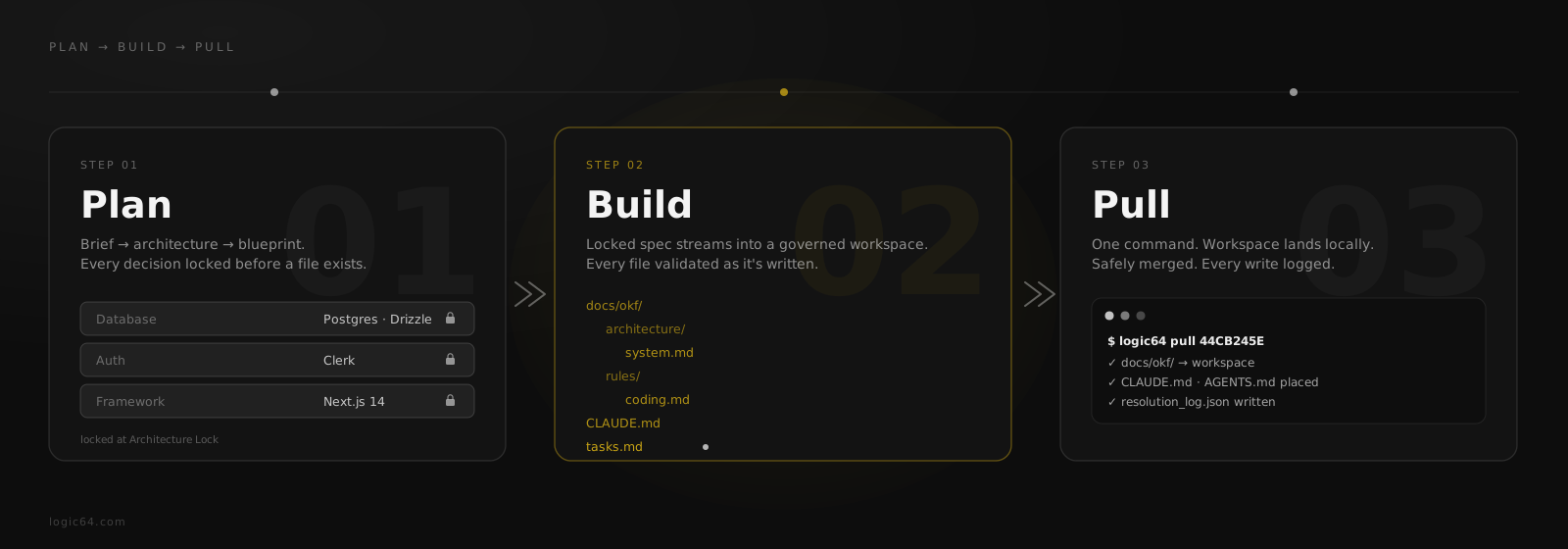
Logic64 splits that single prompt into three distinct phases — Plan, Build, Pull — each with a different job and a different kind of output.
| Phase | What happens | Output |
|---|---|---|
| Plan | Brief → architecture → blueprint, reviewed and locked | A locked Architecture State |
| Build | The governed workspace is generated from the locked state | docs/okf/ knowledge tree + adapters + config |
| Pull | The workspace is safely merged onto your machine | Ordinary local files, versioned and inspectable |
Plan: lock the architecture first
Planning exists to remove ambiguity before it can compound. It moves from a brief, to a proposed architecture, to a validated blueprint — stack, service boundaries, data flow, routing — and ends with an Architecture Lock: a fixed decision set that everything downstream has to respect.
Skipping this phase does not remove the decisions, it just moves them somewhere unreviewed. When planning is skipped, the model fills the gaps itself. That buys speed in the first minute and produces cleanup work for the following week, once two different sessions have quietly disagreed about the same boundary.
Build: generate inside locked boundaries
Build only starts once the architecture is locked, and it produces a full governed workspace from that locked state: the docs/okf/ knowledge tree — architecture, rules, decisions, and context, organized as one inventory — plus the CLAUDE.md, AGENTS.md, and GEMINI.md adapters that route your AI coding assistant into it, the MCP server configuration, and a tasks.md build execution contract.
Before any of that is handed off, it runs through an 11-step validation chain — schema compliance, cross-file consistency, a stack-compliance scan against the locked decisions — so a file that contradicts the architecture gets caught there instead of surfacing later as a bug.
The engine can create files, but the validation layer decides whether those files actually match the locked architecture. That is what keeps the model useful without letting it silently redesign the system.
Pull: bring it onto your machine
A generated workspace that only exists as a remote session is fragile — it is not versioned, not diffable, and not really yours yet. The Pull step exists because developers need normal local ownership: files, commands, and configuration that land on disk and can be inspected, edited, and committed like anything else.
$ logic64 login
$ logic64 pull 44CB245E --latest
✓  docs/okf/ → workspace
✓  CLAUDE.md · AGENTS.md placed
✓  .claude/mcp.json merged
✓  resolution_log.json written
That merge is deliberate, not a blind overwrite: files route to the right destination locally and merge safely into what already exists, and every change is logged to resolution_log.json — so a pull never silently clobbers work you already did in that directory.
What this buys you over one long prompt
A single long-running chat session has no natural place to stop and check that architecture is still correct — it just keeps extending whatever was decided three prompts ago, right or wrong. Splitting the workflow into Plan, Build, and Pull gives each phase a distinct, checkable output: a locked decision set, a validated workspace, and a safely merged local project.
It is slower than one prompt, on purpose. The time it costs up front is the same time a vibe-coded first draft spends later, as a rewrite, once two sessions turn out to have assumed different things about the same system.
Frequently asked questions
What does "architecture-first" mean in an AI workflow?
It means the stack, service boundaries, and data flow are decided and locked before any files are generated, instead of being inferred by the model one prompt at a time. The architecture is treated as a fixed input to generation, not an accidental byproduct of it.
What is the difference between Plan, Build, and Pull?
Plan is where architecture decisions get made and locked. Build generates the governed workspace — the knowledge tree, adapters, and configuration — from that locked state. Pull is the CLI step that brings the finished workspace onto your machine as ordinary, versionable files.
Does logic64 pull just download files, or does it merge into an existing project?
It does a safe merge, not a blind overwrite. Files are routed to the right destination and merged into what already exists locally, and the result is logged to resolution_log.json so you can see exactly what changed.
Related reading