MCP Server Setup: A Practical Guide
How to set up an MCP server for Claude Code: the mcp.json schema, a worked example, secret handling, and project vs global scope.
2 min read
What an MCP server actually is
MCP — the Model Context Protocol — is the standard Claude Code uses to connect to things outside the conversation: a database, a filesystem, an external API. An MCP server is a small program that exposes one of those over that protocol, and Claude Code reads a JSON configuration at startup to know which servers exist and how to reach them.
The mcp.json schema
The configuration is a single JSON object with one required top-level key: mcpServers, whose value is an object keyed by server name. Each entry names the command to run the server and its arguments; any credential it needs goes in an env block, referenced as a placeholder, never written in directly.
{
  "mcpServers": {}
}
That is a completely valid configuration — an empty mcpServers object. There is no requirement to configure anything; a server only gets an entry once you actually need it.
Setting one up, step by step
- Confirm the server you need — the tool or data source you want Claude Code to reach, and the MCP server that exposes it.
- Add an entry under mcpServers with the command and args needed to run that server.
- Reference any secret the server needs as an ${ENV_VAR} placeholder in an env block — never hardcode it.
- Reload Claude Code so it picks up the updated configuration.
- Verify the server shows as connected and a simple request against it succeeds before relying on it.
A worked example
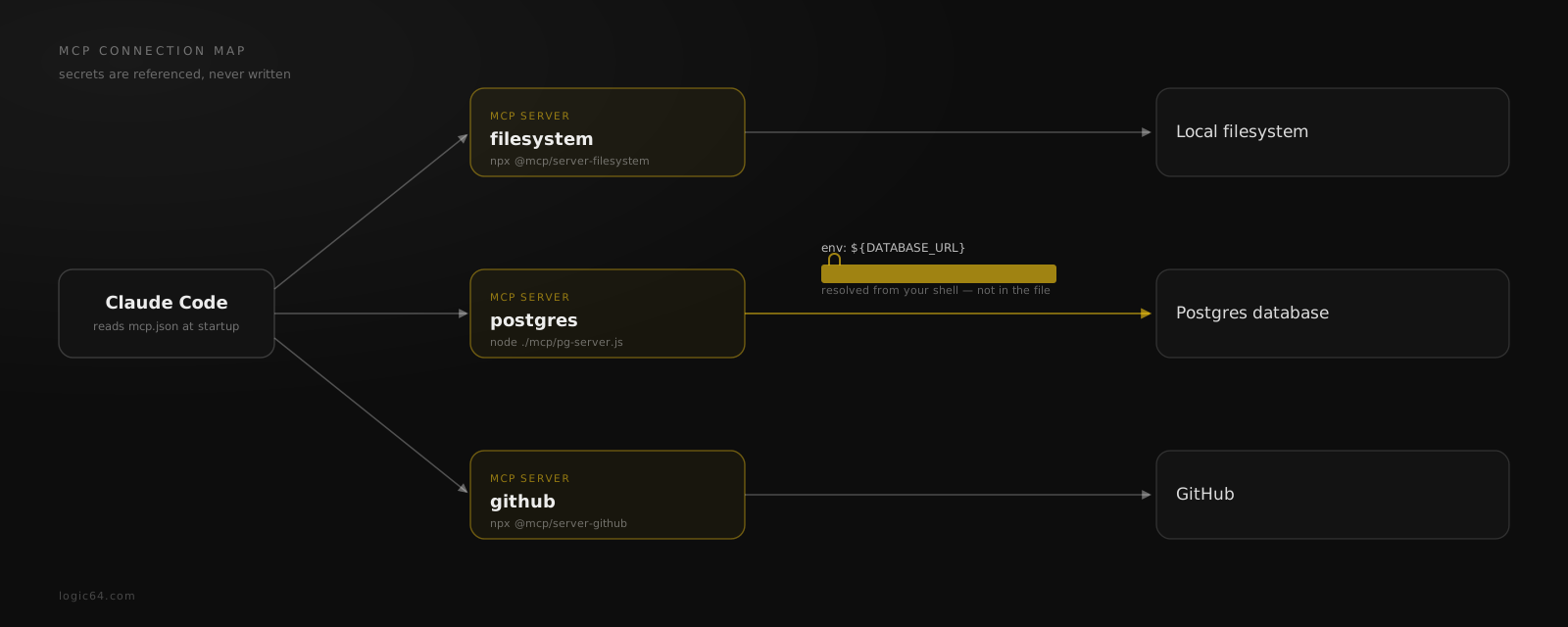
For a project that reaches the local filesystem, a Postgres database, and GitHub, the configuration might look like this — three servers is an example, not a default; your own file should only list what your project actually needs.
{
  "mcpServers": {
    "filesystem": {
      "command": "npx",
      "args": ["-y", "@mcp/server-filesystem", "/workspace"]
    },
    "postgres": {
      "command": "node",
      "args": ["./mcp/pg-server.js"],
      "env": { "DATABASE_URL": "${DATABASE_URL}" }
    },
    "github": {
      "command": "npx",
      "args": ["-y", "@mcp/server-github"]
    }
  }
}
Notice DATABASE_URL is a placeholder, not a connection string. If a real credential ever ends up in this file, treat it as compromised and rotate it — the file is meant to be safe to commit.
Project-level vs global config
A project-level .claude/mcp.json is scoped to that repository only — it travels with the project and applies whenever Claude Code runs there. A separate global configuration can make a server available across every project, but merging a project-level setup into that global file should always be an explicit, opt-in action you take deliberately — never something that happens silently as a side effect of setting up one project.
How Logic64 fits
Logic64 generates .claude/mcp.json as part of the governed workspace it produces from your locked architecture. It populates the file from what you actually configure during planning — and never invents a server you did not ask for. If nothing is configured, it emits a valid, empty mcpServers object rather than guessing.
When you run logic64 pull, that file is routed and safely merged into your local project alongside the rest of the workspace — not silently pushed into your global configuration.
Frequently asked questions
What is an MCP server?
MCP (Model Context Protocol) is the standard Claude Code uses to connect to external tools and data — a database, a filesystem, an API. An MCP server is a small program that exposes one of those to Claude Code over that protocol, configured in a JSON file the assistant reads at startup.
Where does mcp.json go?
At the project level, it lives at .claude/mcp.json inside the repository, scoped to that project only. A separate global config exists for servers you want available everywhere, but merging into it should always be an explicit, opt-in action — never a silent side effect of a project-level setup.
How do I keep secrets out of mcp.json?
Reference them, never write them. Every credential an MCP server needs should appear as an ${ENV_VAR} placeholder in the env block, resolved from your actual environment at runtime — the JSON file itself should never contain a real key, token, or password.
Does Logic64 pick MCP servers for me?
No — it never invents servers. Logic64 populates .claude/mcp.json from what you configure during planning; if nothing is configured, it emits a valid, empty configuration rather than guessing at servers you did not ask for.
Related reading